
DockDoor
See live previews of open Mac windows from the Dock and switch between individual windows with Option-Tab.
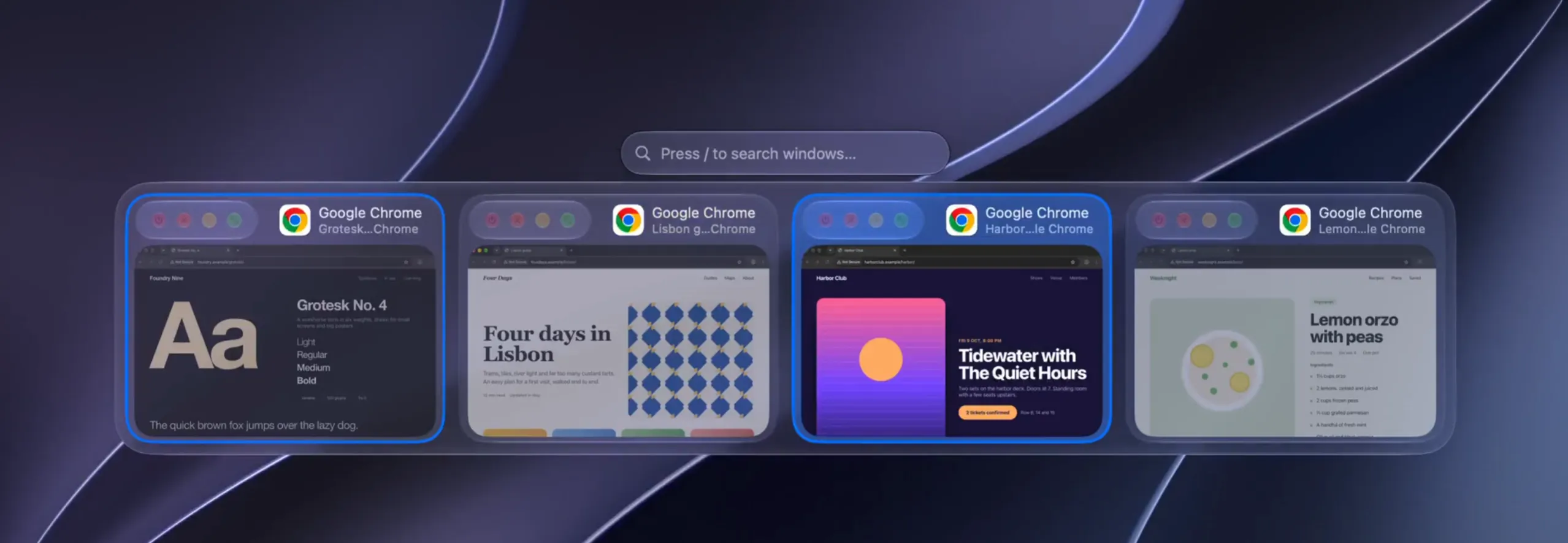
DockDoor is a free, open-source macOS utility that adds live window previews to Apple's existing Dock. Hover over an app icon to see its open windows as thumbnails, then click the window you want. Unlike a Dock replacement, it works alongside the built-in Dock and adds a separate window-by-window keyboard switcher.
Find and manage open windows
- Dock previews: See windows across Spaces and displays, including minimized or hidden windows. Use preview controls to close, minimize, enter full screen, or quit an app without first bringing the window forward.
- Option-Tab switching: Move between individual windows instead of just apps. Search by typing, navigate with the keyboard, and customize the shortcut.
- Command-Tab previews: Show the highlighted app's windows above the built-in macOS app switcher.
- Flexible layouts: Choose thumbnail grids, larger previews, or a compact title list; adjust hover delays, sizing, and controls.
More ways to use the Dock
Optional trackpad gestures can snap windows to screen halves or corners, maximize or minimize them, and control apps from Dock icons. Folder Pop lets users browse and drag files from Dock folders without opening Finder. Music controls can appear when hovering an app playing audio, with synced lyrics for Spotify and Apple Music. DockDoor also supports AppleScript commands for window actions and automation.
Requirements and trade-offs
DockDoor supports macOS 13 Ventura or later on both Apple silicon and Intel Macs. Setup requires Accessibility and Screen Recording permissions so it can identify windows and display previews. Some apps with unusual interface frameworks may not expose every window or action.
The app is licensed under GPL-3.0 and has no paywall, subscription, or trial. According to the developer, window data stays on the Mac, with no analytics or crash reporting. DockDoor Pro is a separate paid app that replaces the Dock; it is not required for these features. Download DockDoor from the official website or its GitHub releases rather than unofficial copies.
More ways to build your Mac setup
Editorial collections for putting together a more useful Mac setup.