
NotchNook
Turn the Mac notch into a panel for music, calendar, notes, timers and a file tray.
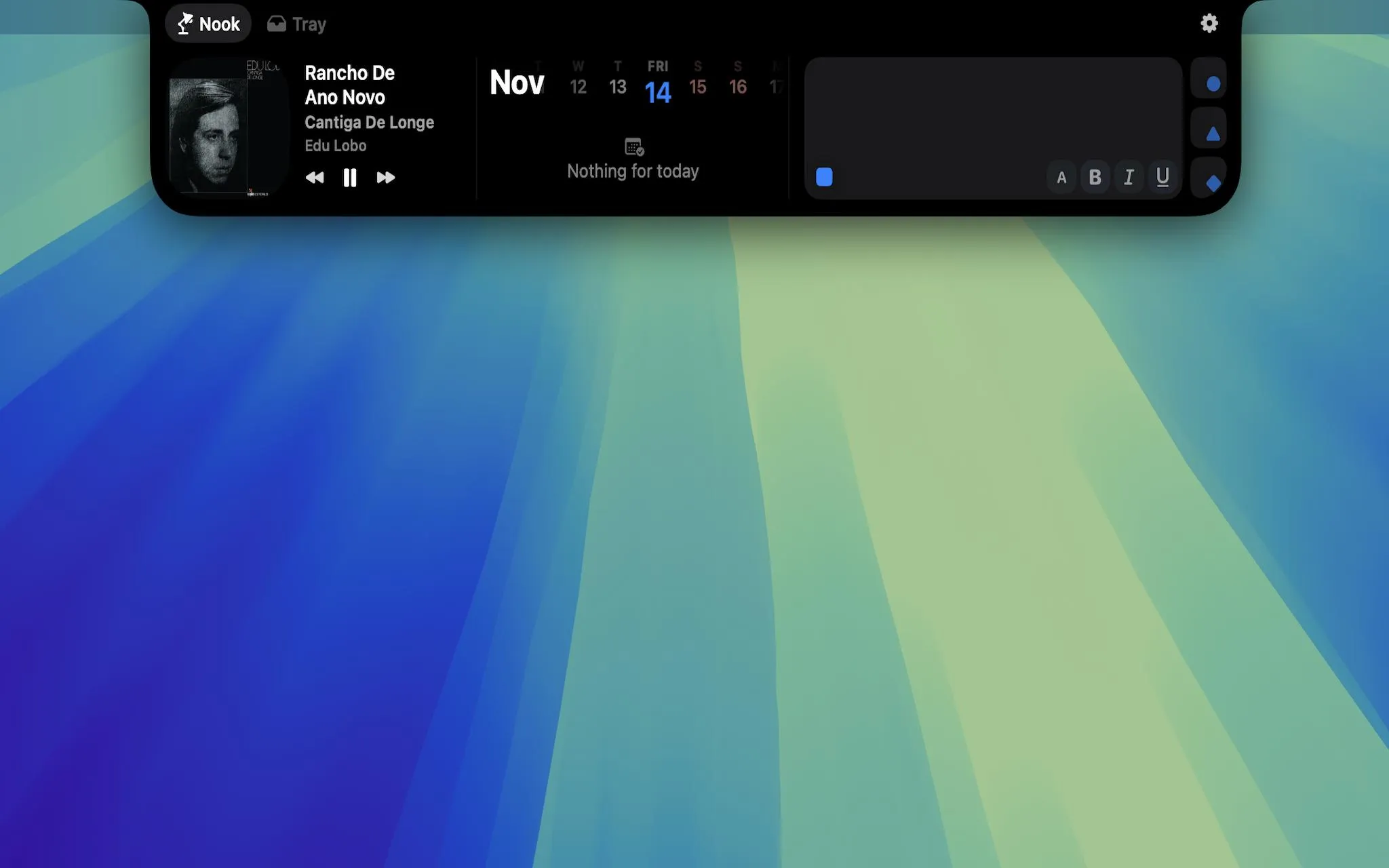
NotchNook is a macOS utility that turns the camera-notch area into an expandable panel for music controls, calendar events, notes, to-dos, timers and files. Move the pointer to the notch or swipe down on a trackpad to open it. Macs without a physical notch get a slim handle at the top of the screen instead.
Everyday controls in one place
- Now Playing: Pause, skip and seek through supported media, with a choice of playback sources such as Apple Music and Spotify.
- Calendar: See upcoming events from the Mac Calendar app, including connected Google calendars, and join supported Meet, Zoom, Teams or Webex meetings.
- Notes and to-dos: Write quick notes with basic formatting, star important tasks and archive completed ones.
- Timers and mirror: Set countdowns using presets or scrollable wheels, or check the camera preview before a call.
- Live activities: See battery status, Bluetooth connection changes and calendar events near the notch.
A temporary shelf for files
The Tray holds files dropped near the notch while moving between Finder and other apps. It can stage multiple files, retain them across app restarts, accept items pasted from the clipboard and send files through AirDrop. It is a handoff tool, not a replacement for Finder or a file backup service.
Compatibility and purchase options
NotchNook requires macOS 14.6 or later and runs on Intel and Apple silicon Macs, including setups with external displays. Calendar, Camera, Bluetooth and Automation permissions support their respective features; Accessibility is used for the volume and brightness display and to detect full-screen apps. The app is distributed from the developer’s website, not the Mac App Store.
All features can be tried free for 48 hours without a payment card. Afterward, a license costs US$2 per month or US$15 as a one-time lifetime purchase, covering two Macs. Purchases through the previous checkout do not activate automatically in the current version; existing customers should consult the developer’s license support before buying again.
More ways to build your Mac setup
Editorial collections for putting together a more useful Mac setup.