🚀 We're still curating great Mac apps. Official launch: November 12, 2026.
Cirrus
Floating Markdown notes from a shortcut, screen edge, or MacBook notch.
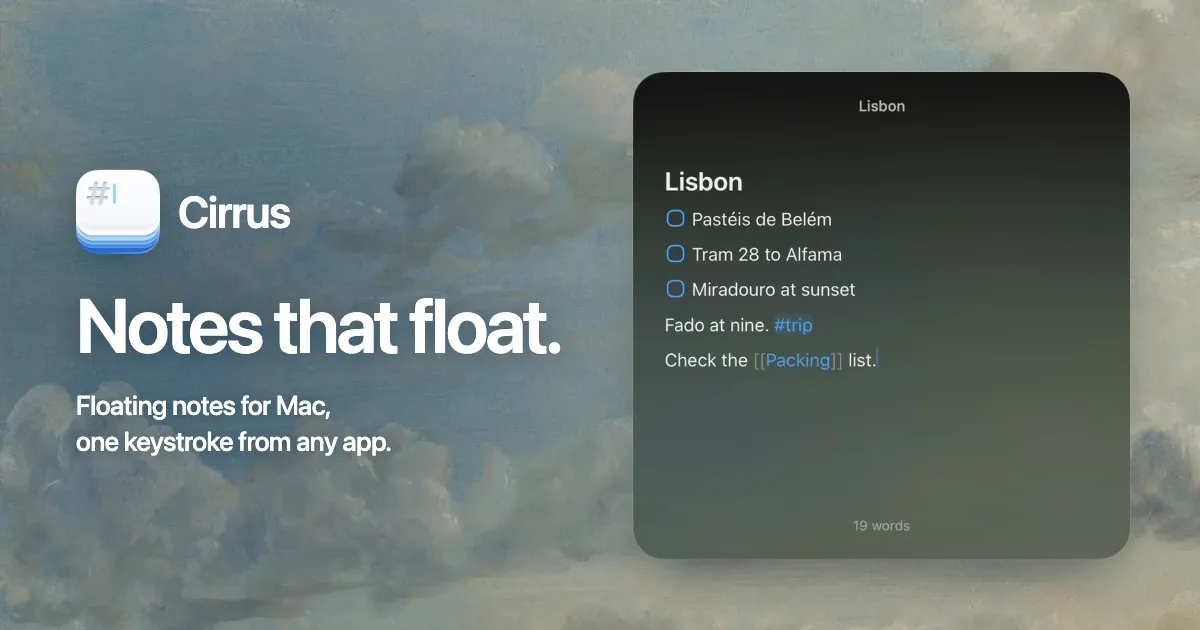
Cirrus is a floating Markdown notes app for macOS built for capturing thoughts without switching windows. Press Control–Command–N to open a note above the app you're using, then press Escape to dismiss it. Notes can also live in a small pill on a screen edge—or in a MacBook's notch—so you can hover to peek or start typing.
Notes that stay within reach
The editor renders Markdown formatting without leaving markup symbols in the way. It handles headings, checklists, colored highlights, tables, images, and code blocks. Connect notes with [[Note Title]] links, add #tags, fold headings, search with Command–P, and pin frequently used notes. Keep Open can leave a note visible while working in another app.
Capture, calculate, and automate
Cirrus evaluates expressions when a line ends in =, including unit, date, time-zone, and currency calculations. Paste Mode collects copied content into a note. Apple Shortcuts, Siri, cirrus:// links, and Spotlight integration provide other ways to access or update notes. A Command–K palette exposes actions without navigating menus.
Sync, customization, and pricing
Notes can sync between Macs through your own iCloud account; iCloud is optional, and no Cirrus account is needed. You can export notes as Markdown, and the app keeps daily backups for seven days. Panel colors, opacity, fonts, and display placement are customizable.
Cirrus requires macOS 14 Sonoma or later. The free version includes all features but is limited to three notes; Cirrus Pro removes that limit for a one-time $4.99 purchase. The app is closed-source and available through direct download, the Mac App Store, or Homebrew.
More ways to build your Mac setup
Editorial collections for putting together a more useful Mac setup.